If your device drops your network connection or fails to load the piece from those URLs, then follow the login prompt to open the login page.
Opening the Piece
Once logged in, users should see a button on the top left of their screen.
Button
Some users will see a button that has some text links by it or below it. Those users should click the Old Devices link and skip to step 6, or try a different web browser.
If you see this, click ‘Old Devices’
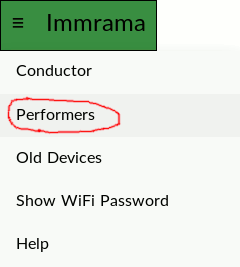
Tap the button. A drop down menu should appear.
Dropdown menu
If no menu opens, click on the Old Devices link near the bottom of the page and go to step 6, or try a different web browser.
Performers should click on the Performers link.
All Performers should then see a screen which says Ready.
Performers should try to use their web browser to make a bookmark of this page. Save the link to your desktop and use that link when you next join the piece.
Some performers will see a small button on the top left corner. They may click it to select Full Screen.
Small button
To keep their screen from turning off, users can stroke the bottom of their screen gently throughout the piece.
Performers should not click the Conductor link. You are on the honor system.
Troubleshooting
When the piece is running, not everyone will see updates at the same time. If you do not see updates at all:
Make sure you are on the right wifi network. If your device allows you to say which devices you prefer, put this one at the top of the list.
If your device keeps switching to another network (such as eduroam) and you can’t get it to stop otherwise, tell it to forget the other network. In this case, you will need to forget the network before every performance or rehearsal of the piece. When you rejoin the ‘forgotten’ network later, you will need to have the password, etc as if you are a new user.
Check if you have javascript disabled. If so, enable it and reload the page.
If you still do not see updates, go back a page and select Old Devices. Be sure to update your bookmark.
Some older models of iPhone just stop displaying the piece after some amount of time has passed. Those users may rejoin the piece by rejoining the network or may wish to find an alternative way of viewing the notation.